Autocomputing Autocomputing.Pro
Sign in

Field Sales · By invitation.

Every door you knock, on the record.

Tap the house, choose what happened and keep walking. Autocomputing.Pro keeps the street, the order you knocked it in and every outcome, then hands the people who say yes to your CRM.

Field Sales Automation App

What is Autocomputing.Pro?

Autocomputing.Pro© is an all-in-one field sales dispatch, door-calling and neighborhood-market tracking application. Assign territory and database access to reps, or program it for independent use.

  • Map

    Satellite view, every door you've knocked colored by its outcome, and Zero-In to find yourself only when you ask.

    A rep finds the end of yesterday's street before parking.
  • Trail

    Your knocks in sequence, filtered by outcome and by a window on a five-hour timeline, or back to the first knock of the day.

    The Not Homes from the first half hour, ready for a second pass.
  • To-Do

    Swipe a knock to the right and it waits on your list. Tap it to walk back to that door.

    Six callbacks, in order, before dinner.
  • Appointments

    Set one at the door. It lands on your phone's calendar through a private feed and on the customer's CRM record.

    A Thursday 6 PM visit, with the gate code in the note.
  • Contacts

    Name, phone and email only when someone gives them to you, with their permission to call or text kept beside them.

    A closed sale arrives in the CRM with its notes attached.
  • Teams

    Invite reps by email. Managers see each rep's knocks, pace and outcomes, and can turn an account off in one tap.

    An owner checks Tuesday's contact rate across the crew.
  • Apartments

    Use the Divide tool to split one address into many, so you can track doors in a complex. For oddly shaped buildings, select Divide with AI. Why? It's self-explanatory.

    Building C, three floors, every unit its own door.
  • Trips

    Log a drive with its vehicle, fuel and expenses, then export the records as CSV or PDF.

    A week of miles and gas, ready for the expense report.
  • Navigation

    Turn-by-turn directions inside the app, spoken aloud, with the traffic lights and stop signs between you and the next turn counted on screen. The screen stays on, and arriving logs the trip.

    Turn at the third light, and the mileage is already written down.
  • Dispatch

    Dispatches posted in your team’s GroupMe arrive as destinations to Proceed to or hold for later. One tap texts the technician your ETA from your own phone.

    The tech is on site at two, and the rep pulls up at ten after.
  • Weather

    Tap the logo for live radar, National Weather Service alerts by county and a forecast briefing for any county. It comes with every plan and is never sold by the seat.

    The crew moves south before the four o’clock storm cell arrives.
  • Follow-Ups

    Mark a sale Closed and Pro schedules the customer’s care: a welcome text from your phone, a check-in at seven days, a first-bill review at thirty, a visit at ninety and an account review every six months after. Arriving at a dispatch adds a next-day call and a one-week text.

    Day thirty: the first bill, reviewed before the customer calls about it.
  • Plan Trails

    Draw a circle or a box on the map, and Pro builds the walking order for every house inside it, neighborhood by neighborhood if you like.

    Two hundred houses, one loop, no doubling back.
  • Training

    Guides, the training manual, call scripts and rebuttals live inside the app, with every sales term a tap away.

    A new rep reads the Google Fi rebuttal between doors.
  • Español

    Settings ▸ Language switches the app, the guides and the training manual to Spanish.

    A bilingual crew on one account, each rep in their own language.

How a knock is kept

  1. 1

    Tap the house

    The address fills in from the roof you touched. Fix it if the map guessed wrong.

    6900 Test St
  2. 2

    Choose the outcome

    Not Home, Lead, Appointment Set, Closed, No Soliciting, Do Not Knock and more.

    Not Home
  3. 3

    Say what matters

    A note rides with the knock and follows the customer into the CRM.

    Back after 5
  4. 4

    It's on the trail

    Time, order and outcome, saved even without signal, and sent when you're back in range.

    4:12 PM · #23

See it work

A dispatch arrives, Proceed picks the route, and Arrived logs the trip.

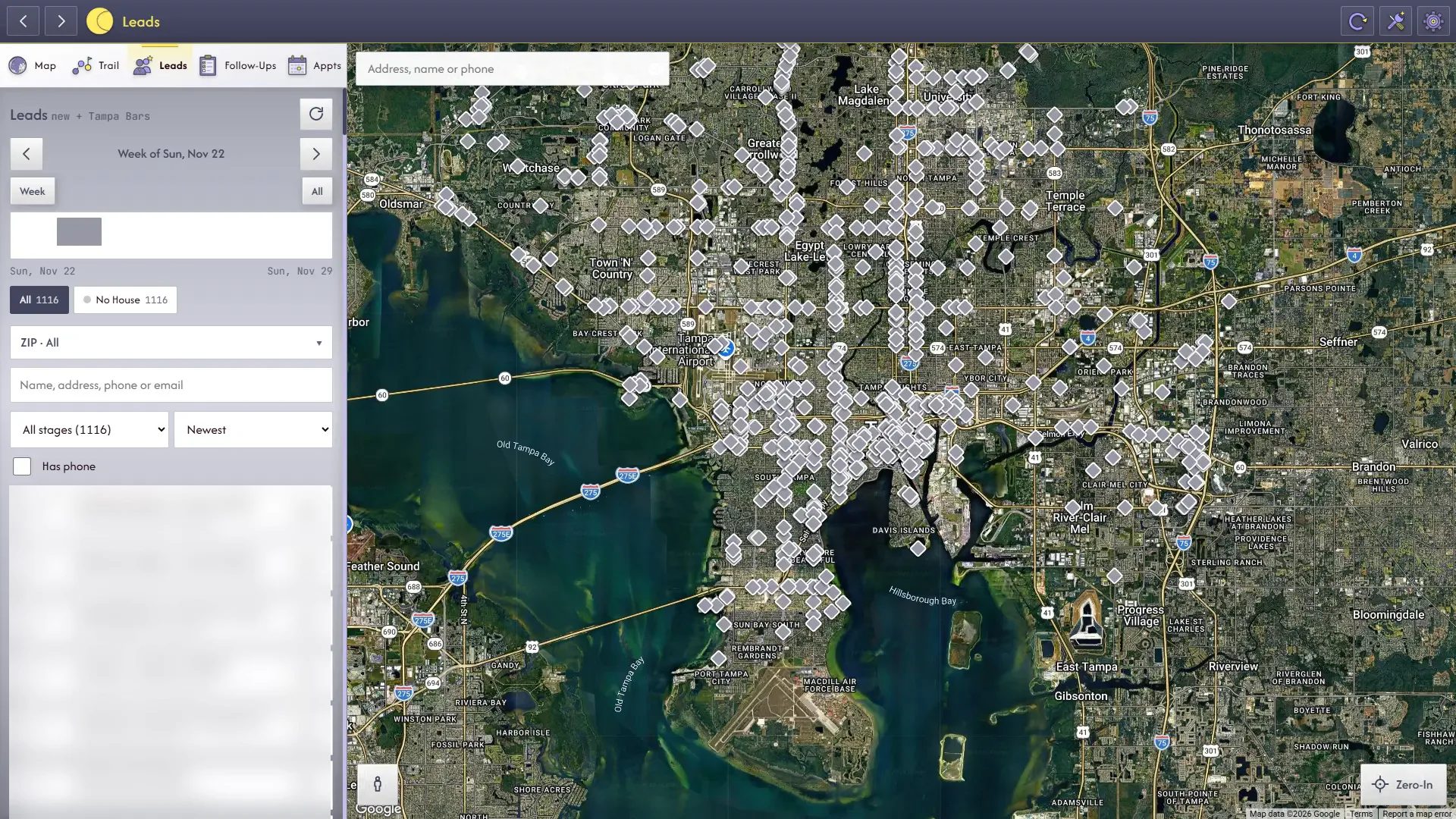
  • Leads beside the map
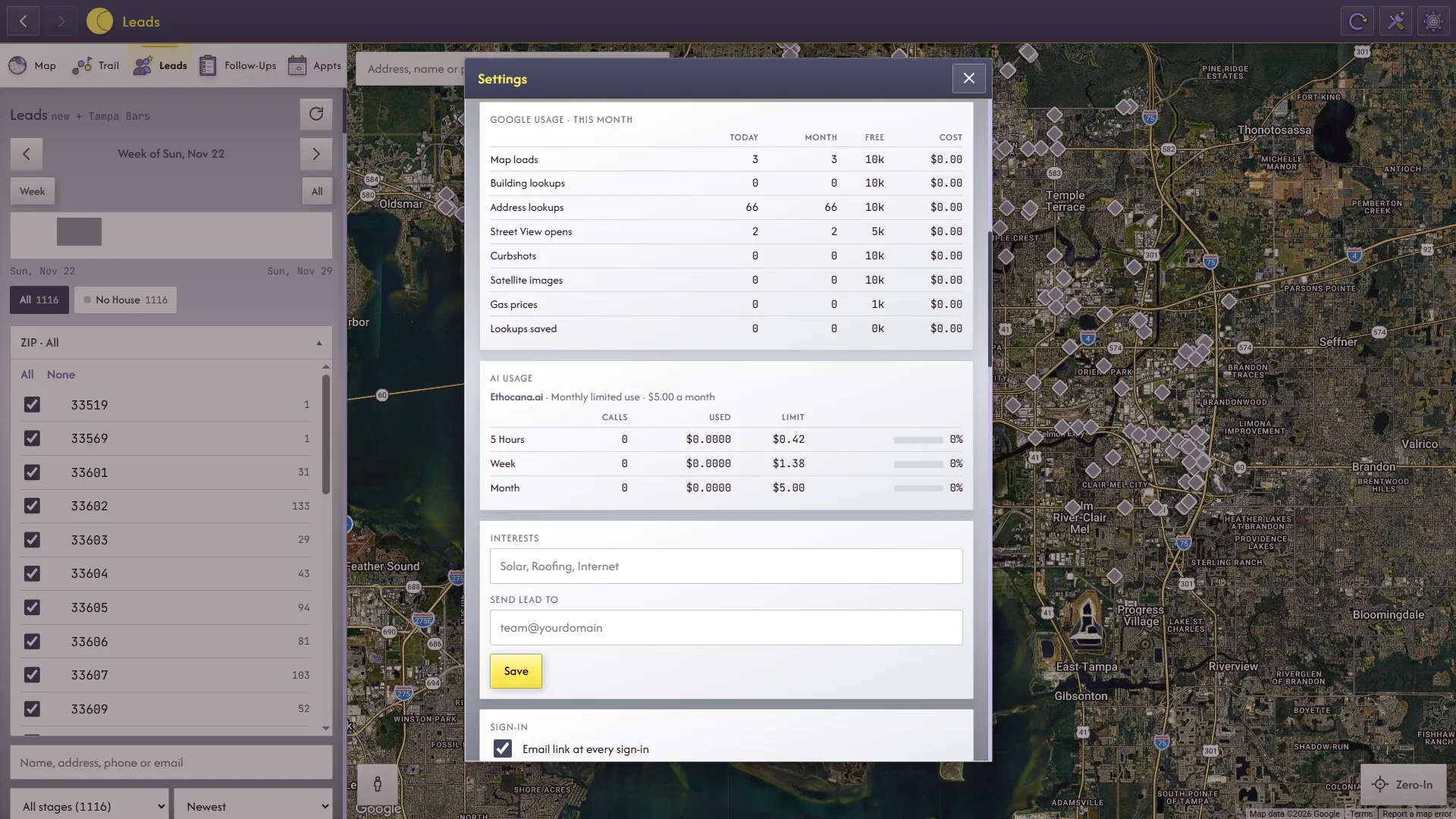
  • Settings with Google and AI usage
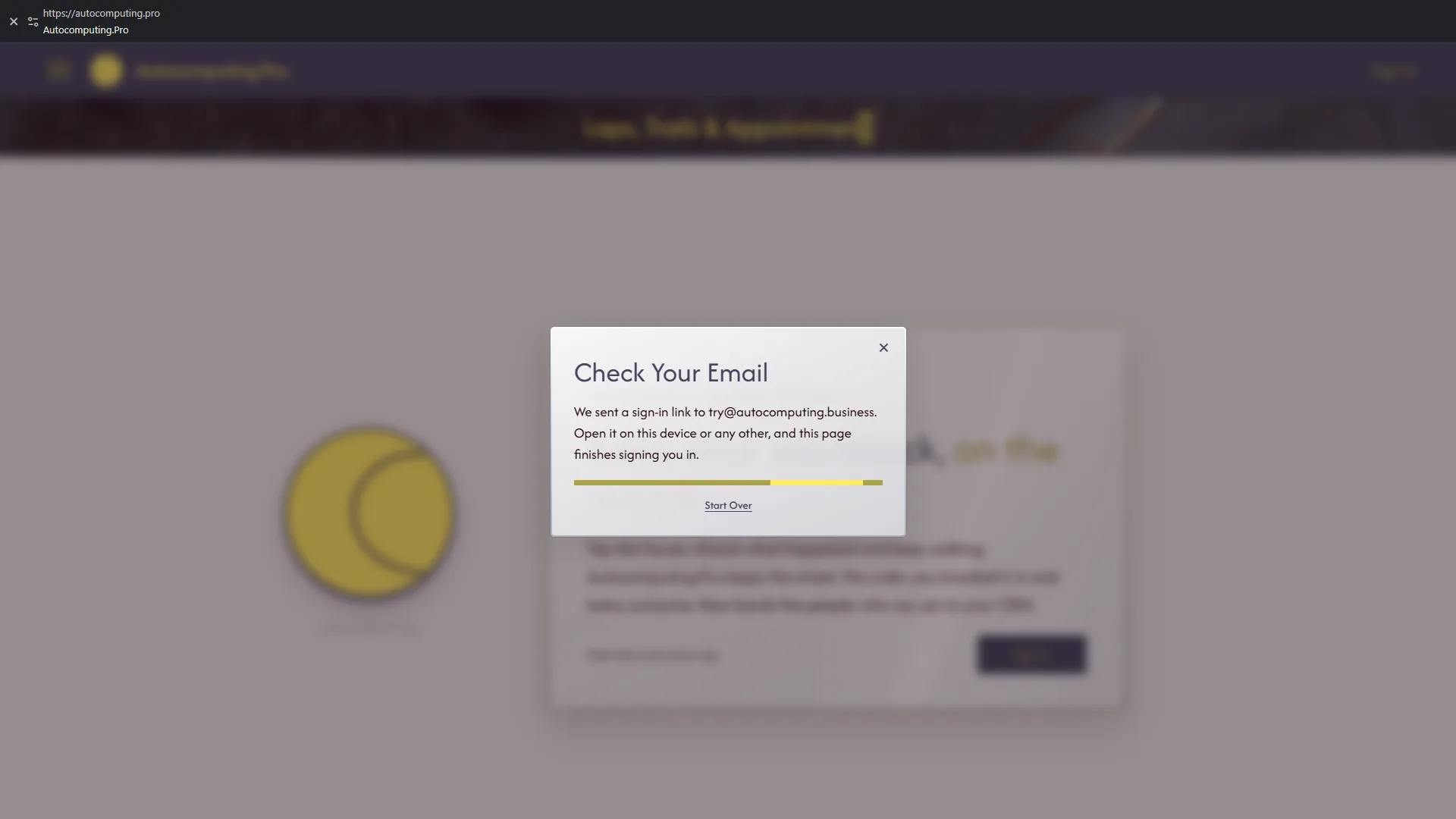
  • Sign-in by emailed link

What it safeguards

Autocomputing.Pro© keeps what a rep learns at the door and nothing it wasn't given. Homeowners aren't profiled, and reps aren't followed unless they choose to be.

  • Switch Off Identifiers

    No preloaded junk metadata or past-tenant contact info prepopulated from minor records sources. Instead, bring your CRM database — or, turn off Leads metadata entirely (for example, perhaps you're an authorized reseller complying with a third-party, and aren't allowed to have their customer data in your door-knocking app).

  • Permission kept

    "OK to call or text" is recorded with its time, so a phone follow-up starts on the right side of the rules.

  • Location on request

    The app finds you when you press Zero-In. Live tracking and breadcrumbs stay off until a rep turns them on.

  • Signed by email

    Invitation only. Every sign-in finishes with a one-time link sent to the account's own address.

These are rules built into the app, not settings a rep has to remember.

Autocomputing.Pro vs SalesRabbit

SalesRabbit bills by the seat and sells weather and homeowner data as add-ons, so the bill climbs with every rep you hire. Autocomputing.Pro© bills by the crew, and navigation, dispatch, weather and mileage come with every plan, so a growing team never renegotiates its tools.

Autocomputing.ProSalesRabbit
PriceFrom $249 a month for up to 10 users, billed quarterly$59 per user a month (Team), $49 to $75 per user a month (Pro)
Setup$2,000 Bespoke Implementation, onceA required implementation package, priced by quote
ContractOne quarter, prepaidOne to three years
WeatherIncluded: live radar, county alerts and forecastsAdd-on, $19 to $31 per user a month
Homeowner dataNever sold to you. Bring your own CRM, and homeowners aren’t profiled.DataGrid AI add-on, $19 to $31 per user a month
Turn-by-turn navigationBuilt in, spoken aloud, with traffic lights and stop signs counted to each turnNot listed
DispatchGroup-chat dispatches become destinations, and one tap texts the technician your ETANot listed
Mileage and fuelLogged on arrival, with gas priced by ZIP code and CSV or PDF exportNot listed
ApartmentsBuildings divided into floors and units, by hand or with AINot listed
LapsNot Homes colored by lap, and Later by lap or by the clockNot listed
Route planningPlan Trails draws the walking order for a whole areaPlan Routes
Follow-UpsCustomer care plans that start on their own after a sale or a dispatch: welcome text, check-ins, bill review and an account review every six monthsAppointment scheduler (Pro plan)
AIMonthly limited use of Ethocana.ai for the app’s AI functions, included with every planDataGrid AI add-on, priced per user
LanguagesEnglish and Spanish built in; any other language added freeNot listed
TrainingGuides, scripts and rebuttals inside the app, in English and SpanishNot listed

SalesRabbit details are from salesrabbit.com (its pricing, DataGrid and Weather pages) on November 17, 2026. Not listed means the feature does not appear on those pages.

AI by Ethocana

Monthly AI with Ethocana.ai

Every Autocomputing.Pro© plan includes monthly limited use of Ethocana.ai for running the app’s AI functions, with no per-seat AI charge.

Ethocana is the AI service of Autocomputing Business Corporation, at ethocana.ai. On its own it is a full AI workspace for $16 a month: chat, research with cited sources, documents and spreadsheets you can download, and tasks that run on a schedule and email you the result.

  • Divide with AIA satellite photo of an oddly shaped complex becomes every unit on its roof, floor by floor.
  • Included with every planMonthly limited use for the whole team, with no add-on to buy.
  • Ethocana on its ownReps and managers can subscribe to the full workspace at ethocana.ai for writing, research and planning off the street.

Autocomputing.Pro and Ethocana are backed by the full faith and credit of Autocomputing Business Corporation.

Visit ethocana.ai

Pricing

One price for the whole crew, with every feature included, billed quarterly in advance. Every account starts with a consultation, and above 150 users we quote.

Up to 10 Users

$249/month

Billed quarterly.

$747 per quarter.

Setup $2,000 once.

  • Every feature, every rep
  • Weather, navigation and dispatch
  • Trips, training and Español
  • Monthly AI use with Ethocana.ai
Book a Consultation

Up to 25 Users

$499/month

Billed quarterly.

$1,497 per quarter.

Setup $2,000 once.

  • Every feature, every rep
  • Weather, navigation and dispatch
  • Trips, training and Español
  • Monthly AI use with Ethocana.ai
Book a Consultation

Up to 50 Users

$899/month

Billed quarterly.

$2,697 per quarter.

Setup $2,000 once.

  • Every feature, every rep
  • Weather, navigation and dispatch
  • Trips, training and Español
  • Monthly AI use with Ethocana.ai
Book a Consultation

Up to 100 Users

$1,599/month

Billed quarterly.

$4,797 per quarter.

Setup $2,000 once.

  • Every feature, every rep
  • Weather, navigation and dispatch
  • Trips, training and Español
  • Monthly AI use with Ethocana.ai
Book a Consultation

Up to 150 Users

$2,099/month

Billed quarterly.

$6,297 per quarter.

Setup $2,000 once.

  • Every feature, every rep
  • Weather, navigation and dispatch
  • Trips, training and Español
  • Monthly AI use with Ethocana.ai
Book a Consultation

Over 150 Users

Quote

By consultation.

Sized to your company.

  • Every feature, every rep
  • Pricing and setup sized to your company
  • AI allowance sized to your team
Book a Consultation

Each plan is billed one quarter at a time, paid in advance, and that quarter is the whole commitment. The first quarter is due at setup. Map and address lookups are included under fair use.

Bespoke Implementation

Autocomputing.Pro is not a download-and-hope app. We set it up around the way your team already sells, connect it to the systems you already pay for, and train your crew on it before the first door.

Setup

Implementation

A consultation and a hands-on setup, priced once, the first time your system goes live.

  • Integration with your current sales setup: CRM, lead lists and dispatch
  • Integrations added to the app for your workflow, like GroupMe dispatch
  • Your website connected, where it applies
  • Accounts, databases and training for your team

Your address

Your Domain

We install Pro on your own web server, so your reps sign in at your address instead of ours.

  • Sign-in at an address like yourcompany.com/app
  • Call the app whatever you like
  • Installed and kept current by us
  • Billed with your plan, every quarter
+$500 / quarterBook a Consultation

Your brand

White Label

Your reps open your app, under your company’s name, with your logo and your colors, and Autocomputing.Pro underneath.

  • Your app’s name and logo on the phone’s home screen
  • Your colors across the interface
  • Your own app in Google Play and the App Store, published under your company’s name where the stores allow it
  • Store accounts and fees covered
  • Billed with your plan, every quarter
+$1,000 / quarterBook a Consultation

Included

Your Language

English and Spanish are built in. If your team speaks something else, we add it at no charge.

  • Haitian Creole, Arabic, Swahili or any other language
  • The whole app, translated by hand
  • Added at setup or any time after

Start here

Consultation

Every account starts with a conversation about how your team sells, so the quote fits the job.

  • Your territory, products and lead sources
  • The systems Pro should talk to
  • A written quote before anything is billed
  1. 01Consultation

    We learn your territory, your products and the systems your team already uses.

  2. 02Written quote

    Your plan, your setup and any white label, priced in writing before anything is billed.

  3. 03Implementation

    We connect your systems, add the integrations your workflow needs and train your crew.

  4. 04Go live

    Your first quarter is paid at setup, and each quarter after is the whole commitment.

Book a Consultation813-906-0050 · Autocomputing Business Corporation

What your team pays

20

SalesRabbit Team at $59 per user a month, and SalesRabbit Pro with Weather and DataGrid AI at their lowest listed rates ($49 + $19 + $19), from salesrabbit.com on November 17, 2026. Setup fees aren’t included.

Part of Autocomputing

Autocomputing.Pro© sends customers to the CRM in Gridtop©, where your email, campaigns and phone system already work from the same records. Accounts are by invitation: ask your team's admin for yours.

Sign In

Accounts are by invitation. Your sign-in finishes with a link sent to your email.

  • Invited? Use the link in your invitation to set your password first.